Ultimate checklist: What you need to know to start taking payments for your business

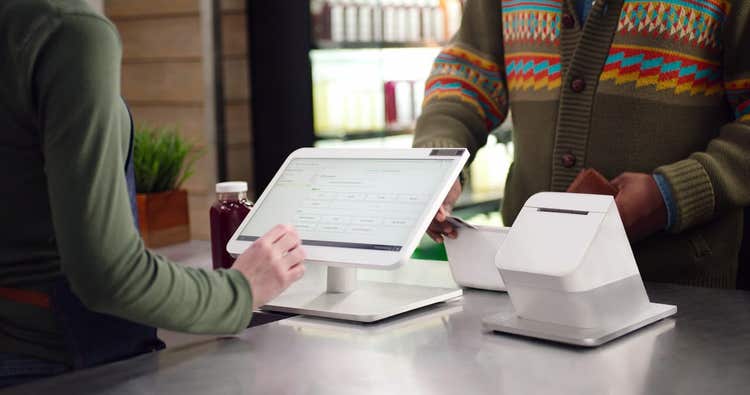
As you prepare to open your doors (virtually or literally) to new business, one of the final steps before you welcome customers is understanding how to start taking payments.
Whether you’re launching a new venture or adding a new point-of–sale (POS) system to your store, you can use this checklist to get up and running. And, if you need help, Clover’s got you covered.
7 steps to taking payments
- Set up a merchant account
- Choose a payment service provider
- Understand payment gateways
- Prepare for contactless payments
- Get onboarding support
- Integrate with other apps
- Report and analyze your results
The Checklist
1. Set up a merchant account
You’ll need:
- A merchant account, a special type of bank account that allows Small Businesses to accept payments made via credit card, debit card, or mobile wallet. Merchant accounts (or third-party equivalents) are required for card acceptance.
- A POS system to apply online for a merchant processing account.
2. Choose a payment service provider
A payment service provider, also known as a payment processor, is a vendor that facilitates communication between the merchant, the credit card network, and the cardholder’s bank. Here’s what to consider when choosing a payment processor:
- Industry – Some PSPs offer unique features for restaurants, retailers, or service businesses.
- Size of your business – Some PSPs charge different rates for bigger businesses vs. solopreneur ventures.
- Budget – Payment processors leverage a variety of pricing models. Read our guide, “Credit Card Processing – What Is It and How It Works”
- Payment options – Clover accepts credit cards, debit cards, gift cards, and contactless payments.
- Transaction fees – Clover charges processing fees starting at 2.3% + 10¢, one of the most competitive rates in the industry.
- Security – Look for a vendor that’s PCI and EMV compliant.
TIP: Keep in mind that there may be other fees and hidden charges, depending on your provider.
3. Understand payment gateways
A payment gateway securely transmits online payment data to the processor to continue the lifecycle of the transaction. It also authorizes payments for card-not-present transactions, mostly for eCommerce websites. Think of it as an online point-of-sale terminal for your business. Note these considerations:
- Not all merchant account providers have a payment gateway. Some providers use a third-party payment gateway–although, this setup can be a hassle when you have a dispute.
- It may be best to select a merchant account and a payment gateway from a single provider. Using a payment gateway to securely process integrated payments can reduce errors, speed up transaction processing, and ease reconciliation.
4. Prepare for contactless payments
More than half of US consumers now prefer to check out using contactless payments. Contactless payments can be completed with digital receipts, so the entire process is touch-free. Just follow these steps:
- On your Clover device, open the Sale app.
- Enter the sale amount, then tap Charge.
- If you’ve enabled prompting for invoice numbers (or your custom identifier), enter an identification number, then tap Continue.
- Hold the card or phone over the EMV contactless logo.
- Ask the customer to sign or enter a PIN as necessary.
- If the customer signed, tap Verify to accept their signature.
- Select how customers will receive their receipt, or tap Void Transaction to void the payment.
- Tap Done.
5. Get onboarding support
- Make sure your partner provides onboarding support and training for you and your team.
6. Integrate with other apps
- Make sure the payment processor you choose offers a suite of additional apps, features, and tools that can make it easier to run your business.
7. Report and analyze your results
- Familiarize yourself with the reporting and analytics features of your payment processor.
Clover’s got you covered
Clover can help you get payments up-and-running quickly and easily. With an easy application process and features to offer the insights you need to run your business, accepting payments with Clover’s a virtual snap.
- Easy online application – The online application for Clover is quick, and our devices arrive payments-ready, so that you can start accepting credit cards immediately.
- Contactless payments – Clover offers Virtual Terminal, a way to accept payments anywhere with your computer, tablet, or smartphone—no device needed. And, it’s simple to set up your device to accept contactless payments.
- Help when you need it – At Clover, we provide 24/7 US-based customer support via chat, email, and telephone for all of our U.S. merchants. We also offer multiple levels of support, including onboarding and activation, and regularly conduct merchant interviews as part of our proactive merchant support.
- Apps to help you run your business – Check out the Clover App Market to see all the apps–free and pay-for-play–integrated with Clover to help your business run smoothly.
- Reports an analysis to help you make decisions – Clover’s reporting features help you glean key insights, such as your busiest times and your best-selling items, as well as monthly sales trends.
Clover offers a POS system to meet your unique needs. To learn even more about getting started with Clover and accepting your first payment, connect to the Clover sales team today.
Stay in touch
Sign up and learn more about Clover.
More posts about starting a small business




Related Posts


Payments & processing